Run actions with Ask
Let Ask continue an investigation using project actions, with write access and limits you choose.
Enable Run actions
Normally Ask answers a question and stops. With Run actions, it works through a larger task by itself: it decides which actions to run, runs them on your sheets, reads the results and carries on. Use it for jobs with several steps, such as "find every filing that mentions a payment, extract the amount and the payee, and list the largest".
Because it changes your sheets and can spend money on paid models, you set limits before it starts.
Open Ask, choose a Model and the sources to work on, then click + below the question box and turn on Run actions.
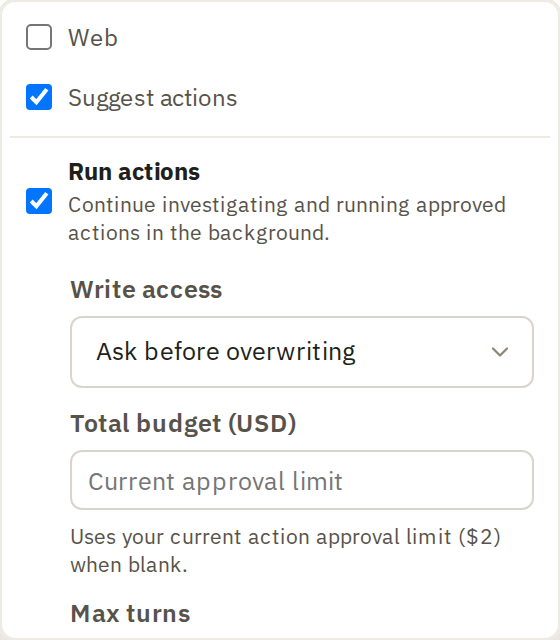
Choose access and limits
Write access sets when Ask stops to ask your permission:
- Ask before each action: it asks before every action. Choose this the first few times, so you see what it's doing.
- Ask before overwriting, the default: it runs actions that add new columns, and asks before anything that would replace existing values.
- Full access: it can also replace existing values without asking first. Your budget and other limits still apply, and it still asks before anything outside the project. Use it only for work you could redo.
Total budget (USD) caps what it can spend on paid models. Leave it blank to use your usual approval limit. Max turns caps how many steps it takes; blank means no limit.
Under Skills, choose which of your saved skills it may use. All enabled skills are selected to start with.
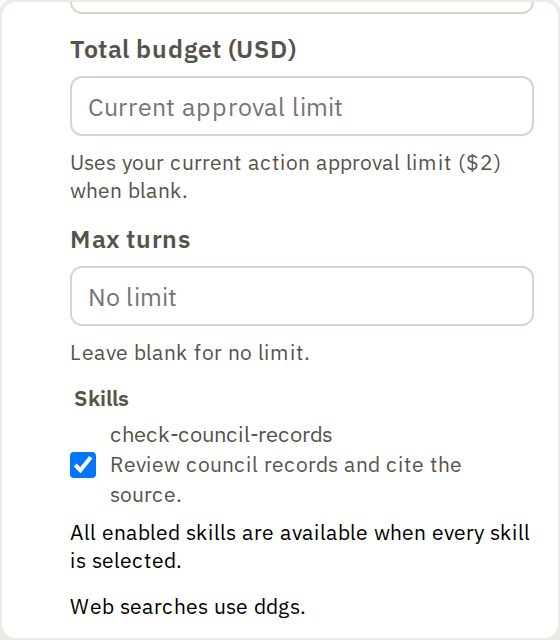
Describe the task, then click Send.
Follow the investigation
Ask shows each step in the conversation as it goes. When it needs permission, it shows the action, which rows it will run on and the estimate. Read them, then click:
- Continue to let it run.
- Skip to skip that action and carry on, when offered.
- Stop to end the investigation.
If it reaches the budget or turn limit, it stops and asks. Enter a new limit and click Continue, or stop there. Anything it has already done stays on your sheets.
When it finishes, check the columns it created the same way you'd check any action's output.