Inspect the source behind a result
Follow recorded evidence to the cited passage, page or recording before accepting a value.
Open a recorded source
When an action extracts a value with citations on, it records where in the source it found it: the passage, the page, or the time in a recording. That's the quickest way to check a value: go to the passage and read it.
You can open citations in two places:
- In Review, the passage behind each value is highlighted in the source on the left. A tab appears for each cited source.
- In a row's details, a value with a recorded citation has an Evidence chip. Click it to open the cited source.
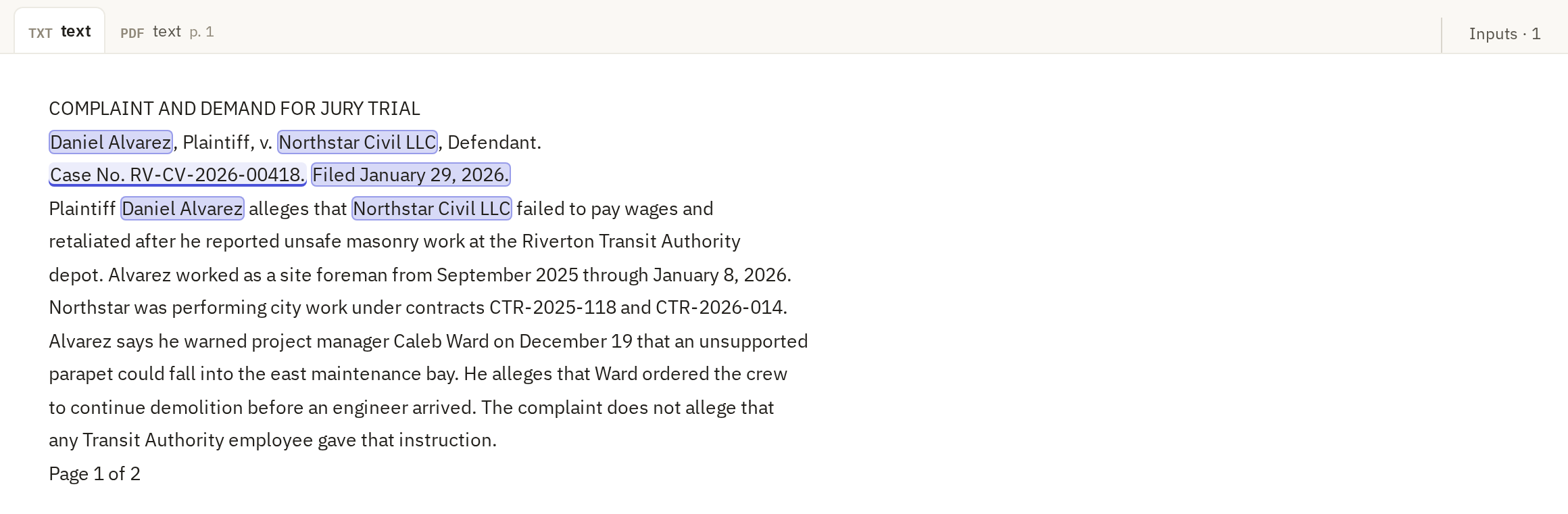
When you read a citation, check that the passage says what the value says, not just something nearby. A citation for a filing date that points at a hearing date is a wrong answer with a real citation.
Check which source is shown
Not every value has a citation. Actions run with citations off record none, and some inputs, such as PDFs sent directly to a model, can't be cited. In Review, a value with no citation shows the row's current input instead, marked "Current input · no saved citation for this result". That's what the row holds now, not proof of what the action read.
A citation can also go stale: the source changed after the action ran, for example because you ran OCR again. The row's details then show stale evidence. Open it. For a text source, click Try to find this passage to look for the same words in the current source. If Frisket can't find them, the value may no longer be supported; check the source, and run the action again if needed.